> ## Documentation Index
> Fetch the complete documentation index at: https://docs.flow-board.co/llms.txt
> Use this file to discover all available pages before exploring further.
# Screenshot/Figma Converter
Export a screen from Figma as a **PNG**, import it into Flowboard, and Flowboard will convert it into a real **Flowboard-compatible screen**.
This is not a flat image embed. Flowboard generates a real screen structure that you can edit in the Flowboard editor and display in your app through the normal Flowboard runtime.
## What it does
Use this when you already designed a screen in Figma and want to turn it into an editable Flowboard draft faster.
Flowboard will:
* read the PNG you exported from Figma
* rebuild the screen as a real Flowboard screen
* insert it into your draft flow
* keep it editable in the visual editor
## Typical workflow
Design your screen in Figma
Export the frame as a **PNG**
Import that PNG to your Flowboard Flow
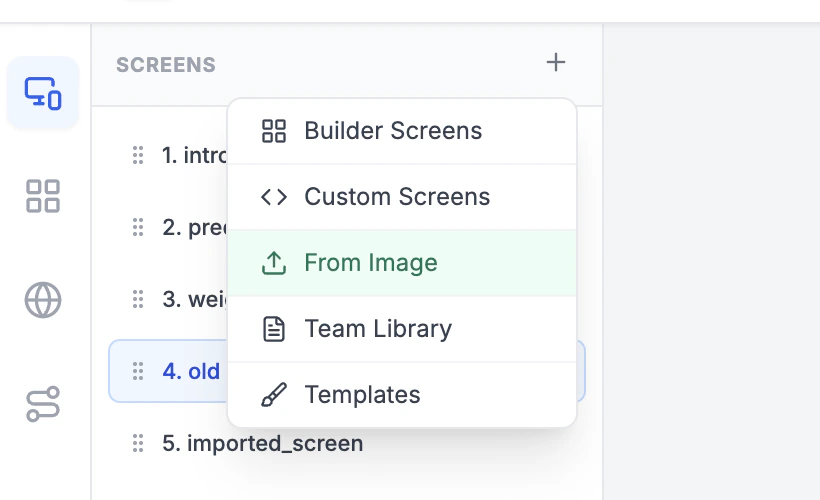 Let Flowboard convert it into a real screen inside your draft
Review the result, edit the components, then publish as usual
## What you get after conversion
After import, the result lives in your flow draft as a real screen, not just a screenshot.
That means you can:
* edit text, layout, spacing, and colors
* change buttons and actions
* adapt the screen to your flow logic
* preview it in Flowboard
* ship it in your app with the standard Flowboard SDK
## Best results
For the cleanest conversion:
* export **one screen at a time**
* use **PNG**
* export the actual frame, not the whole Figma canvas
* avoid comments, selection outlines, or editor overlays in the export
* use a clean mobile screen capture rather than a crowded board screenshot
Flowboard works best when the PNG clearly represents one final screen with readable text and obvious structure.
## Important note
The imported result is a strong starting point, not a locked artifact. You should still review the generated screen and adjust details before publishing.
Let Flowboard convert it into a real screen inside your draft
Review the result, edit the components, then publish as usual
## What you get after conversion
After import, the result lives in your flow draft as a real screen, not just a screenshot.
That means you can:
* edit text, layout, spacing, and colors
* change buttons and actions
* adapt the screen to your flow logic
* preview it in Flowboard
* ship it in your app with the standard Flowboard SDK
## Best results
For the cleanest conversion:
* export **one screen at a time**
* use **PNG**
* export the actual frame, not the whole Figma canvas
* avoid comments, selection outlines, or editor overlays in the export
* use a clean mobile screen capture rather than a crowded board screenshot
Flowboard works best when the PNG clearly represents one final screen with readable text and obvious structure.
## Important note
The imported result is a strong starting point, not a locked artifact. You should still review the generated screen and adjust details before publishing.